
Most commercial and multifamily buildings already own all the pieces. There is an alarm panel in a back room, cameras covering the entrance and the parkade, a fob reader at the front door, and an intercom panel in the lobby. Four systems, sitting on the same property, installed in different years by different companies.
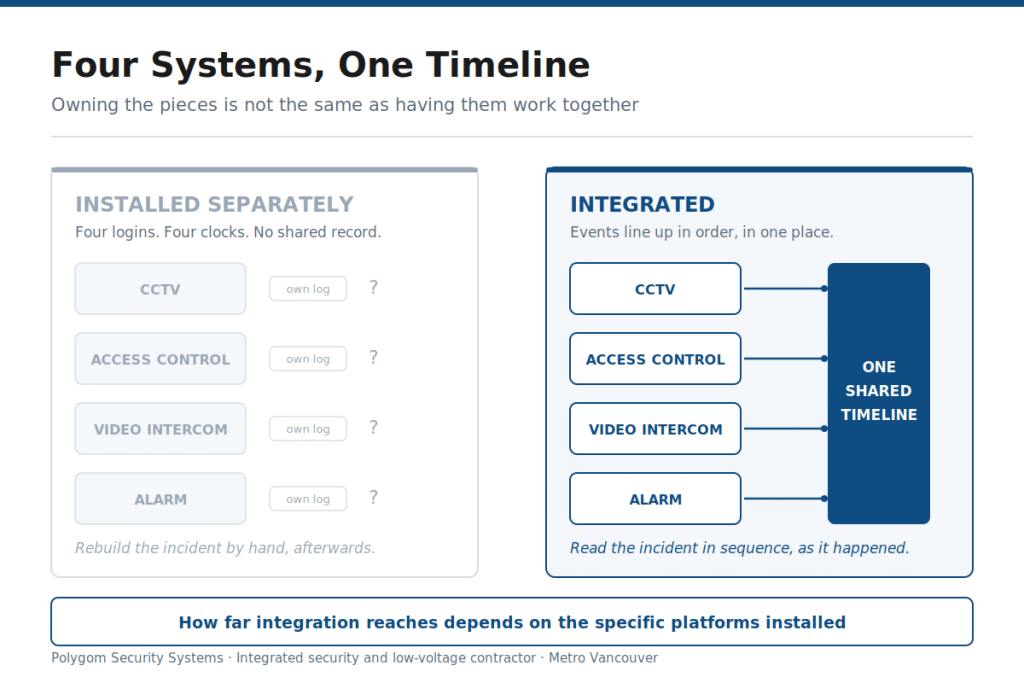
Owning them is not the same as having them work together. When something happens at 2am, someone opens one app for the camera feed, logs into a second to see who badged in, and reads the alarm notification on their phone, then tries to line up three different clocks to work out the order of events.
Security system integration is the work of connecting those systems so an event in one is visible in the others. How far that can go in a particular building is a real question with a real answer, and it depends on what is already installed. Here is how we approach it.
Want to know what your existing systems can actually do together?
We survey what is already installed, confirm what those specific platforms support, and tell you what is achievable before anything goes into a proposal. Sometimes more is possible than owners expect. Sometimes less. Either way you get a straight answer rather than a general assurance.
Call or request a site assessment.
What Security System Integration Actually Means
Having systems installed on the same property is not integration. Integration means they share information through common software or a supported connection, so that what one system sees can appear in another.
| Systems installed separately | Systems integrated |
|---|---|
| An alarm triggers. Someone opens a separate application to find the matching footage. | The alarm event and the relevant camera view can be brought up together, depending on what the platforms support. |
| A denied credential is logged, but nobody sees it until a report is pulled weeks later. | Access events can surface as notifications rather than sitting in a log. |
| Three or four logins, three or four clocks, no shared timeline. | One place to review an incident, with events lined up in order. |
| Adding a door or a building means setting up another standalone system. | New devices can often be added to the existing platform rather than starting again. |
The word “can” is doing real work in that right-hand column, and it is deliberate. Which of these your building gets depends on the specific products involved. Two properties with similar-looking equipment can end up with very different results.
Where Integration Matters Most
The value is highest where nobody is physically present to watch things happen.
A property manager running a portfolio of strata and commercial buildings across Metro Vancouver cannot stand at every entrance. Neither can a strata council. When systems are separate, you find out what happened by assembling it afterwards from three sources. When they are connected, the picture arrives already assembled.
The buildings where this comes up most in our work:
- Multifamily and strata properties with a lobby entrance, a parkade, amenity doors and a mail room, all of which need to be understood together rather than one at a time.
- Commercial properties with multiple sites, where one person is responsible for buildings they are not standing in.
- Warehouse and industrial sites with large perimeters and few staff after hours.
- Buildings with a history of incidents at a specific door, where the useful question is always who was there and what happened, not simply that an alarm sounded.
What Integration Can Do, and What That Depends On
This is the section where most security content overpromises, so we will be careful with it.
The behaviours below are common in current commercial platforms. Whether any of them are available in your building depends on the specific products installed, how they are licensed, and whether the connection between them is supported by the manufacturers rather than improvised.
| What happens | What an integrated setup may allow | What it depends on |
|---|---|---|
| An alarm zone activates | The camera covering that zone can be linked to the event so footage and alert are reviewed together | Whether the panel and the video platform support a common connection |
| A credential is denied repeatedly | The access event can raise a notification with the matching camera view attached | The access platform’s event handling and what the video system accepts |
| A door is forced or held open | The door contact can generate an event that is recorded alongside footage of that entrance | Door hardware condition and how the contacts are wired, as much as the software |
| A visitor calls the intercom | The call, the door release and the entry can appear as one record rather than three | Whether the intercom and access platforms are designed to work together |
| An incident needs reviewing later | Events from each system can be read in sequence instead of cross-referenced by hand | Whether all systems share a time source and retain data for the same period |
That last row is the one people overlook. If your camera system keeps 30 days and your access platform keeps 90, the timeline only reaches back as far as the shortest one. It is worth checking before you need it rather than after.
Modernizing Without Replacing Everything
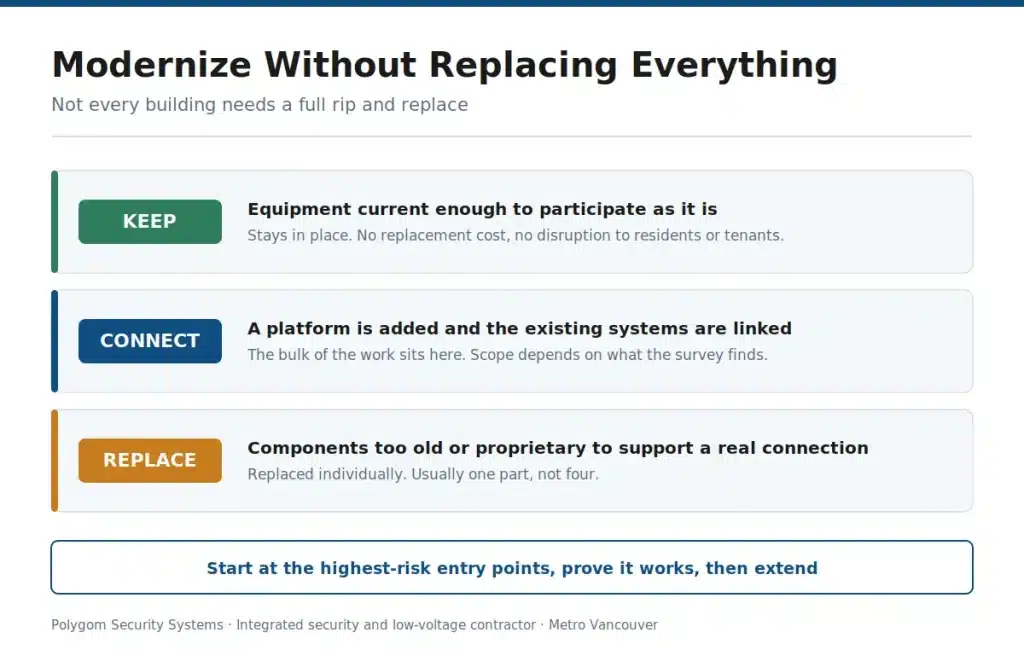
The assumption we run into most is that integration means ripping everything out and starting over. In a number of buildings it does not.
Where existing equipment is current enough to support a supported connection, the work can be limited to adding a platform, connecting what is already there, and replacing only the components that cannot participate. That is often a fraction of a full replacement, both in cost and in disruption to residents or tenants.
Where it does not work is when a component is old enough, proprietary enough, or unsupported enough that no manufacturer-backed connection exists. In that case forcing it usually produces something fragile that fails quietly six months later and nobody notices until it is needed.
Telling those two situations apart is what a survey is for. We would rather advise a property manager that one of their four systems has to be replaced before integration is worth doing than connect everything loosely and call it integrated.
A staged approach works well here. Start with the highest-risk entry points, prove the setup, then extend to the parkade, amenity doors and secondary entrances as budget allows. That also suits how strata and commercial budgets are usually approved.
What Determines Whether Your Systems Can Be Integrated
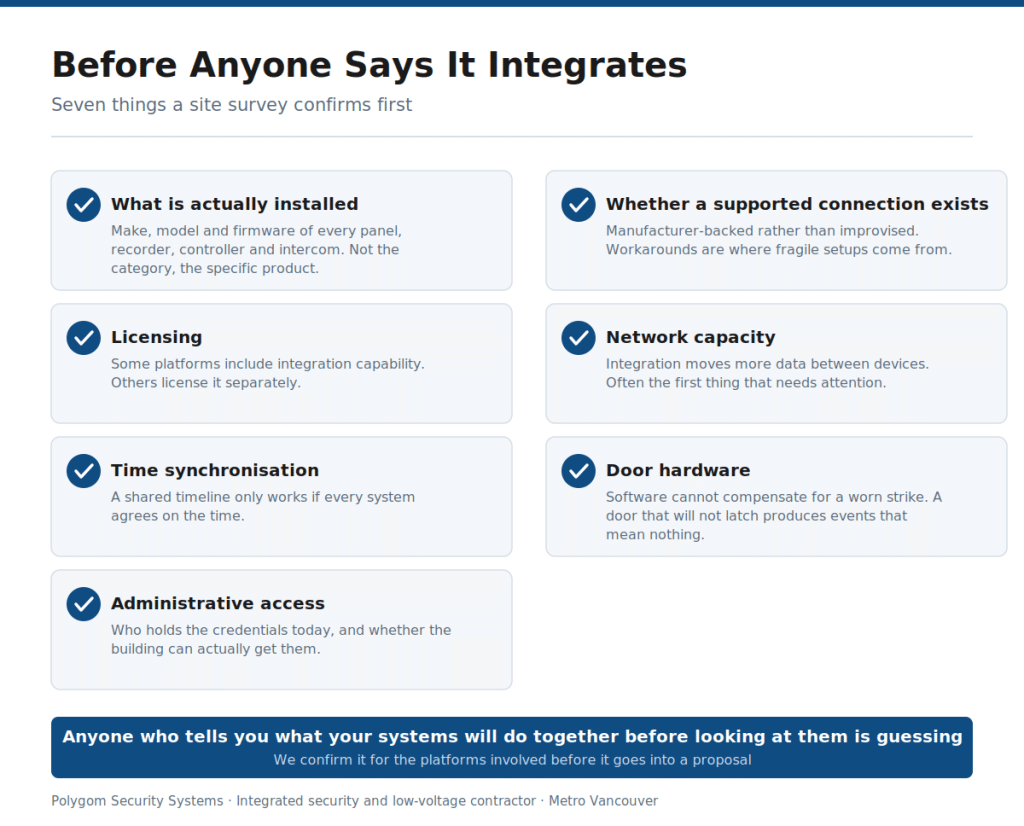
These are the things we look at before saying anything definite:
- What is actually installed. Make, model and firmware version of each panel, recorder, controller and intercom. Not the category, the specific product.
- Whether a supported connection exists between them. Manufacturer-backed rather than a workaround. Workarounds are where fragile setups come from.
- Licensing. Some platforms include integration capability, others license it separately. Worth knowing before it appears as a surprise line item.
- Network capacity and segmentation. Integration moves more data between devices. The network and structured cabling often needs attention before anything else does.
- Time synchronisation. A shared timeline only works if all systems agree on the time.
- Door hardware. Software cannot compensate for a worn strike or a misaligned closer. A door that does not latch reliably generates events that mean nothing, which is why door hardware often lands in the scope.
- Who holds administrative access to each system today, and whether that access is actually available.
That last point delays more projects than any technical issue. A previous vendor holding the only administrator account for a system is a common and entirely solvable problem, but it is better discovered during a survey than during installation.
Integrated Platform vs Standalone Monitoring
Standalone alarm monitoring means a triggered sensor produces a call or a dispatch. That is the whole transaction. There is no footage attached and no connection to who entered beforehand.
| Standalone monitoring | Integrated platform | |
|---|---|---|
| What triggers a response | Sensor activation on its own | Sensor activation with related camera and access data available alongside it |
| Verification before dispatch | Generally none | Footage can support a decision, where the platforms allow it |
| After an incident | Alarm log only | Alarm, video and access records reviewable together |
| Day to day management | Separate logins and separate habits per system | Fewer places to look, depending on how far the integration reaches |
The alarm itself does not change. It senses the same things either way. What changes is how much context arrives with the alert. For properties that want someone actually watching rather than only recording, live video monitoring is a separate decision worth considering alongside this one.
Where These Projects Go Wrong
- Buying hardware before confirming it connects. The most expensive mistake and the most common. Confirm the specific combination first, in writing.
- Treating the network as an afterthought. An overloaded or flat network turns a well-designed system into a slow one.
- Doing everything at once. Start where the risk is, prove it works, then extend.
- Assuming it maintains itself. One offline component removes the context the whole setup exists to provide, and it usually fails quietly.
- Skipping the handover. A combined alert is worth nothing if the person on duty at 2am has never been shown how to read it.
- Losing administrative access. Make sure the building holds its own credentials, not only the vendor.
Platforms We Work With
We install, integrate and service a range of commercial and multifamily platforms, including SALTO, 1VALET, ButterflyMX and Avigilon, along with other systems used in this market.
We are deliberately not a single-brand shop, and that matters more in integration work than anywhere else. The right combination for a building depends on what is already installed, what has to connect to what, how the property is managed and what the owners need. A platform that works well in a new concrete high-rise with structured cabling throughout can be the wrong answer in an older walk-up.
So we look at the building first and recommend second. If a property has already committed to a platform, we will work with it and tell you plainly where the building is likely to make that difficult.
After Installation: Service and Maintenance
Integrated systems have more points that can quietly stop working than standalone ones do, because a connection can fail without the individual devices failing. The cameras still record, the panel still arms, and the link between them is gone. Nobody notices until an incident.
For property managers this is worth putting on a schedule rather than leaving to chance. A maintenance program that checks the connections, the retention settings, the time sync and the administrative access on a regular cycle costs far less than discovering the gap during an incident review.
We service systems we did not install, which for portfolios assembled over many years from several vendors is usually where the conversation starts.
The Short Version
Integration is worth doing where it removes the work of assembling an incident by hand from three sources. In commercial and multifamily buildings, where nobody is standing at every door, that is most of the time.
What is achievable in your building depends on what is already installed, and that is a question with a specific answer rather than a general one. Anyone who tells you what your systems will do together before looking at them is guessing.
And if only part of your setup can participate, that is useful to know. It usually means replacing one component rather than four.
Find out what your building’s systems can do together.
Polygom Security designs, installs, integrates and services CCTV and video surveillance, access control, video intercom, alarm systems and monitoring, structured cabling and networking for commercial, multifamily and strata properties across Vancouver, Burnaby, North Vancouver, Port Moody, Surrey and the Lower Mainland.
Call or request a site assessment. You can also browse our completed projects.
Frequently Asked Questions
Do we have to replace our existing systems to integrate them?
Not necessarily, and it depends on what is installed. Some equipment supports a manufacturer-backed connection and can participate as it is. Older or proprietary components sometimes cannot, in which case replacing that one part is usually more sensible than replacing everything. A survey of the specific makes and models is what settles it.
Can cameras, access control and video intercom all be brought onto one platform?
Sometimes, and how far it goes depends on the specific products. Rather than accepting a general assurance that everything works together, ask a vendor to confirm it for your exact combination before it goes into a proposal. That is what we do before quoting.
How long does an integration project take?
It varies more than most people expect, because the timeline is driven by what has to change rather than by the number of doors. A project where existing equipment participates as it is looks very different from one where a component has to be replaced or new cabling has to be run. We give a schedule after the survey, not before it.
Will integration reduce false alarms?
Having footage available alongside an alarm event gives whoever is responding more to work with, which can help. Whether it changes your dispatch outcomes depends on your monitoring arrangement and how the platforms are configured, so treat it as a likely benefit rather than a guarantee.
Does integration increase our ongoing costs?
It can, because some platforms license integration capability separately or involve a software subscription. Ask for ongoing costs to be itemized separately from the installation price so you can see what you are committing to year after year.
What happens if one system goes offline?
The individual systems generally keep doing their own job, but the connection between them stops. That is the failure mode worth planning for, because it is quiet. Regular checks of the links, not just the devices, are what catch it.
We have systems from four different vendors. Where do we start?
With an inventory. Make, model and firmware for each component, plus who currently holds administrative access. That single document answers most of the questions before anyone quotes anything, and missing administrator credentials from a previous vendor is a common early obstacle.
Do you only work with certain brands?
No. We work with several commercial and multifamily platforms including SALTO, 1VALET, ButterflyMX and Avigilon, and we are not tied to any of them. We assess the building and the existing infrastructure first, then recommend. If a platform has already been chosen, we will work with it and say honestly where the building may make that difficult.


